
Purpose-Built for Senior Care Communities
SHOPS is a Point of Sale (POS) system built specifically for senior care communities that’s user-friendly for staff and provides robust reporting for management
The Simple, Turnkey POS That Provides Clear, Actionable Reporting for Senior Communities
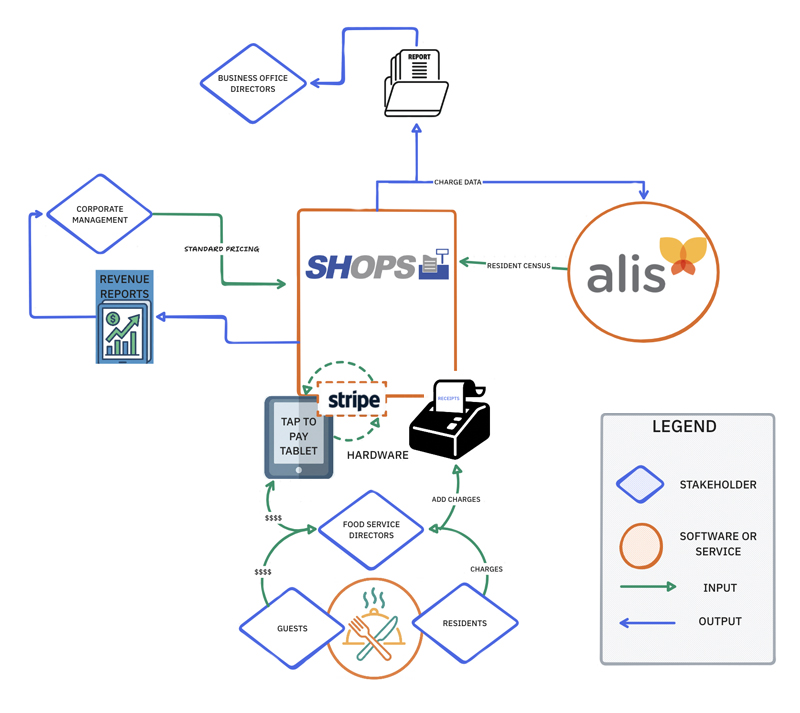
What really sets SupplyHawk’s POS (SHOPS) apart is its seamless two-way integration with major billing and EMR/eMAR systems, allowing resident census to flow in automatically, and charges to flow out on-time, automatically. It’s a simple, turnkey solution that supports dining, salons, gift shops, concierge services and more, while providing leadership with the clear reporting they need across locations. And because every meal and service is captured in real time, families gain meaningful visibility into dining habits and daily activity, helping them understand both wellness patterns and the monthly bill with far greater clarity.
Key Features
Flexible account and payment options including spend down accounts, points systems, custom meal plans, credit cards, and gift cards
Easy menu management with tools to load menus and set menu cycles
Mobile-friendly tablets for users including tap-to-pay NFC devices
Resident attributes that track details such as allergies and preferences, which are printed in red so kitchen staff see them clearly
Self-service portal offers transparency to residents and families with real-time access to balances, statements, and daily activity
Personalized implementations including system configuration, menu setup, and onsite staff training
Credit card payments with one-step processing via direct STRIPE connection
Use Cases
SHOPS includes customized features for every venue on campus, from the dining room to the salon to the gift shop.
- Dining Room: Servers provide tableside service and enter orders on tablets; kitchen staff receive orders through printers, a KDS system, or both.
- Bistro: Staff enter orders on a user-friendly terminal.
- Bar: SHOPS supports custom alcohol sales rules and policies.
- Salon: Stylists enter charges for beauty services using a dedicated tablet.
- Concierge: Staff record ancillary services such as additional housekeeping, maintenance, transportation, or guest room charges from the concierge desk.
- Catering: Chefs bring SHOPS tablets to outside events and process payment on location.
- Gift Shop: Patrons purchase items using barcodes and a handheld scanner
- Café/Deli: SHOPS integrates with scales for salad bars, delis, and other weighed items.
SHOPS Integration
SHOPS eliminates the manual, error-prone process facing business offices today, where ancillary charges are emailed, scribbled on notes, or forgotten entirely.
Instead of requiring information to be keyed into billing or eMAR systems themselves, SHOPS automatically imports resident census data and exports charges in the correct format, on scheduled dates, so directors can simply review instead of re-entering.
Unlike restaurant-style systems that don’t receive senior-care census data, resident names and attributes appear instantly at the point of service, making it easy to record charges accurately across dining, salons, and other services.
Frequently Asked Questions
What makes SHOPS different from restaurant-style POS systems?
SHOPS is designed specifically for senior living communities—not restaurants—so it integrates directly with resident census data and supports multiple venues and services across the campus. This ensures every charge is tied to the correct resident or guest and processed accurately without manual effort.
Can SHOPS accommodate complex menu cycles, seasonal menus, or multi-venue operations?
Yes. Menu maintenance can be managed at the chef or corporate level. Seasonal or periodic menu updates are available as an optional service.
How does SHOPS handle tax, alcohol rules, or different resident/guest pricing across locations?
During implementation, all pricing, tax rules, alcohol policies, guest charges, and location-specific workflows are reviewed, documented, and built directly into your system. SHOPS is highly configurable to reflect your exact operating procedures.
What does the SHOPS implementation process include?
We build your menu in the system, configure billing or meal plans, add staff, set up resident census integration, and automate charge exports according to your chosen schedule. All equipment is pre-programmed for your building. A SHOPS implementation specialist installs the hardware onsite, validates your menu, and trains servers, chefs, business office staff, and the executive director. The specialist stays onsite through breakfast, lunch, and dinner to ensure a smooth go-live. Implementations typically take 3-4 weeks of preparation and 2-3 days on site.
How do we access SHOPS technical support?
Call our team or submit a ticket. Our support team is reachable by phone during business hours Monday–Friday, and our after-hours system ensures urgent needs are still addressed. Our team is committed to rapid response and industry-leading resolution times.
Discover the POS Designed Specifically for Senior Living Communities
See how SHOPS simplifies point-of-sale across every venue on your campus—from dining to the salon to the gift shop—with automated billing integration and clear reporting for management.